




Back in early 2025, my small online store in Kyiv was growing fast—orders rolling in, customers asking questions, suppliers emailing updates. But my inbox? It was a war zone. I’d wake up to 200+ unread messages, spend mornings replying to the same questions (“When will my order ship?”), afternoons chasing abandoned carts, and evenings drafting follow-ups that felt robotic. By Friday, I’d be exhausted, and half the time I’d miss something important. Sales dipped because responses were slow, and I was losing that personal touch that made customers come back.

Then, in mid-2025, I decided to experiment with AI—not the flashy chatbots, but actual agents that could think like me. I started small: one bot for customer support. Within weeks, it was handling 70% of inquiries on its own—politely explaining shipping times, suggesting alternatives if something was out of stock, even escalating tricky cases to me with a summary. The relief was immediate. No more 3 a.m. panic-checking emails. Customers got answers in minutes, not hours, and my open rates climbed because replies felt human.
Fast-forward to February 2026: My email automation now runs like a quiet team member. It personalizes abandoned cart reminders (“Hey [Name], that cozy sweater is still waiting for you—here’s 10% off to bring it home”), nurtures leads with timed sequences based on their browsing, and even drafts replies in my casual Ukrainian-English mix. I’ve reclaimed about 15 hours a week—time I now spend on product ideas, supplier calls, and actually enjoying the business. Revenue? Up 35% in the last quarter, mostly from faster conversions and happier repeat buyers.
This isn’t unique to me. Across small businesses in 2026, stories like this are everywhere. A Toronto boutique owner I connected with on LinkedIn saw similar results: AI emails boosted her repeat purchase rate by 28% because they felt tailored, not templated. A consultant friend automated lead follow-ups and closed deals 40% faster. The common thread? Starting simple, letting AI learn your voice, and keeping a human eye on the important stuff.
If you’re feeling that same inbox overload, here’s how I built my system—step by step—so you can adapt it without the trial-and-error headaches.
My Practical Step-by-Step Setup for AI Email Automation
Step 1: Face the Mess (Audit Week)
Spend one week tracking everything:
- How many emails per day?
- Top recurring questions (e.g., “tracking number?”, “refund policy?”)
- Time sinks (follow-ups, cart reminders) I used a simple spreadsheet. This showed me support took 60% of my email time—prime candidate for automation.
Step 2: Pick One Pain Point to Fix First
Don’t boil the ocean. I chose customer support replies. Why? High volume, repetitive, direct impact on satisfaction.
Step 3: Choose a Beginner-Friendly Platform
I started with something no-code and forgiving (more tool recs below). Connected my Gmail, fed it sample past replies, and set basic rules: “If question about shipping, pull order data and reply with ETA.”
Step 4: Teach It Your Voice & Rules
Upload 20–30 of your best emails. Add instructions like:
- “Always be friendly and helpful, use casual tone like ‘Hey there!’”
- “Include tracking link if available”
- “If unsure, say ‘I’ll check with the team and get back in <1 hour’ and notify me” Test on fake emails. Tweak until it sounds like you.
Step 5: Add Triggers & Personalization
Set automations:
- New order → thank-you email with tips
- Abandoned cart (after 1 hour) → gentle nudge with discount code
- Inquiry with keywords (“refund”, “exchange”) → auto-reply + ticket creation Pull data from Shopify or your CRM for names, order details—makes it feel personal.
Step 6: Launch Small, Watch, Improve
Start with 20% of traffic. Monitor:
- Open/click rates
- Customer feedback (surveys or replies)
- My own time saved After a month, expand. My agents now learn from interactions—better every week.
Step 7: Add Layers (Once Comfortable)
Integrate with calendar for bookings, SMS for urgent cases, or social for multi-channel. Always have an “escalate to human” button.
This journey took me from dread to delight. Tools evolve fast in 2026, but the mindset stays the same: automate the boring, humanize the important.
Tools That Actually Helped Me (No Hype, Just What Worked)
- Zapier — My foundation. No-code glue for everything. Connected email to Shopify, created triggers. Free tier got me started; now on paid (~$20/mo). Super reliable.
- ActiveCampaign — For sequences and predictive timing. AI suggests best send times; my abandoned carts now convert 2x better. ~$15/mo entry.
- HubSpot AI — Free CRM base with smart drafting. Great for lead nurturing; drafts in my style. Zero cost to start.
- Lindy AI — The “agent” feel I wanted. Handles multi-step tasks (e.g., check order → reply → log note). Trial free; pro affordable.
- Gmelius — Gmail overlay. AI suggests replies in shared inboxes; perfect when I add a VA.
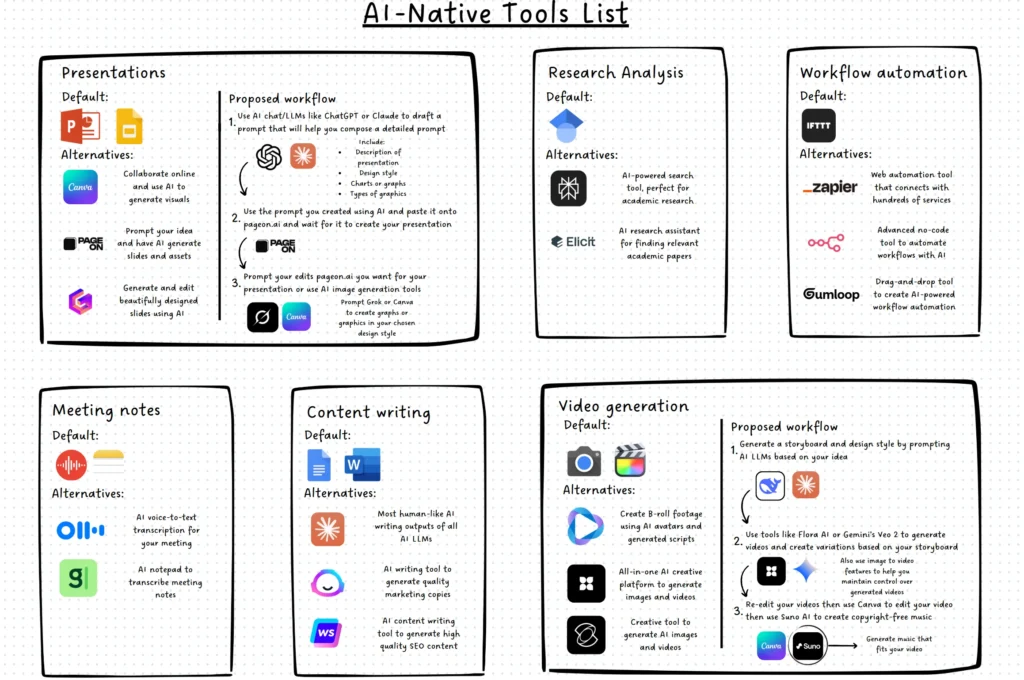
All have trials—test one pain point first. For full tool breakdowns, see AI Tools Reviews in 2026: How to Choose the Best AI Tools for Growth, Automation, and Productivity.
Closing Thoughts: Your Turn to Reclaim Time
If my story sounds familiar, start today. Pick one repetitive email task, set up a basic agent, and watch the hours return. It’s not magic—it’s just smarter tools doing the grunt work so you can build what matters.
What’s your biggest email headache right now? Drop it in the comments—I’d love to share what worked (or didn’t) for me.
For more ways to level up with AI:
- How to Create Viral Talking Object Videos with AI in 2026: Easy Step-by-Step Guide
- Social Media Growth in 2026: Key Trends, Strategies, and Tools
- AI Guides & Tutorials in 2026: Building Scalable Systems with Automation, AI Tools, and Smart Workflows
- AI Tools Reviews in 2026: How to Choose the Best AI Tools for Growth, Automation, and Productivity
Here’s to calmer inboxes and bigger wins in 2026. 🚀
Leave a Reply